ADZ is a regional logistics provider operating primarily across China, specializing in fast domestic delivery services. The carrier handles millions of parcels annually, connecting major cities and smaller towns with reliable same-day and next-day delivery options. ADZ has built its reputation by focusing on speed and cost-effectiveness, making it a popular choice for e-commerce businesses and individual shippers who need quick turnaround times within China's vast market.
With operations spanning across multiple provinces, ADZ maintains a network of sorting facilities and local delivery stations. The company competes with larger carriers by offering personalized service and flexible pickup options for businesses of all sizes. Their infrastructure continues to expand as China's logistics sector grows, particularly in supporting B2B and marketplace seller operations.
ADZ's service areas continue to grow. The carrier focuses on routes that connect production hubs to major consumption centers, making them particularly valuable for small manufacturers and sellers who need affordable distribution without the overhead of larger carriers.
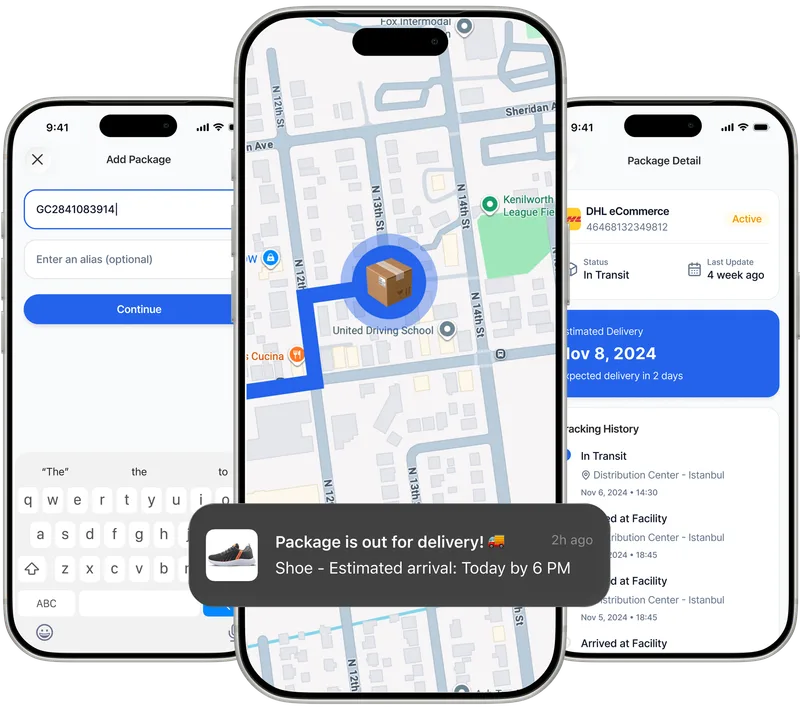
Paxlo eliminates the hassle of juggling multiple tracking websites and apps. When you add an ADZ tracking number to Paxlo, you get instant access to real-time status updates right on your phone. No more searching for tracking websites or manually entering numbers each time you want an update.
The app consolidates all your shipments in one place. Whether you're tracking five parcels or fifty, Paxlo keeps everything organized. You'll receive instant notifications when your ADZ package is picked up, in transit, out for delivery, or delivered. This matters because it means you're never left guessing about where your shipment actually is.
ADZ parcels move fast, and Paxlo keeps pace. Once your package enters ADZ's network, Paxlo pulls the latest tracking data and pushes it to your phone in real-time. You won't miss critical updates about delays, route changes, or delivery windows. For businesses shipping multiple orders daily, this visibility becomes invaluable when managing customer expectations and handling inquiries.
The app also lets you customize notification preferences. Want alerts only for failed delivery attempts? Need updates every time the status changes? You control what matters to you. This flexibility beats the one-size-fits-all approach of most carrier websites.
Most Chinese e-commerce businesses use multiple carriers depending on destination and speed requirements. Paxlo supports ADZ alongside other major carriers, so you're not stuck managing several different apps or browser tabs. Add your ADZ tracking numbers alongside parcels from YTO, ZTO, STO, and other carriers, and watch them all update in one place.
This consolidated approach saves time. Instead of opening five different websites to check the status of shipments from five different carriers, you open Paxlo once and see everything.
Adding an ADZ tracking number to Paxlo is straightforward. Paste the number into the app or let Paxlo auto-detect it from your order confirmations. The app immediately syncs with ADZ's tracking system and begins pulling updates. From that moment forward, you receive all status changes without any additional effort on your part.
For e-commerce store owners using major platforms, Paxlo can integrate directly with your order management system, automatically pulling tracking numbers and matching them to customer orders. This removes manual data entry entirely, whether you're running a Shopify store or managing orders through WeChat or Taobao.
ADZ maintains customer service offices in major cities, and Paxlo's real-time tracking helps you resolve issues faster. If a customer contacts you about a delayed package, you can check ADZ's exact tracking status in seconds and provide accurate information immediately. This reduces back-and-forth communication and builds customer trust.
Paxlo also maintains historical records of all your ADZ shipments. If you need to reference a delivery date, investigate a lost package, or confirm what happened with an order from months ago, the data is right there in your app. This becomes crucial for disputes and returns management.
Download Paxlo from the iOS App Store or Google Play. Create an account, then add your first ADZ tracking number. Within seconds, you'll see the current location and status of your parcel. Add more numbers as needed. The app stores everything securely, so your tracking history is always available whenever you need it.
Whether you're a casual online shopper tracking a single purchase or a business managing hundreds of daily shipments, Paxlo makes ADZ tracking faster, more convenient, and more reliable than checking the carrier's website every time.
Open the Paxlo app and tap the plus icon to add a shipment. Paste your ADZ tracking number into the search field. Paxlo will automatically detect the carrier and connect to ADZ's tracking system. Once added, you'll receive real-time updates for that shipment without any additional setup required.
Download Paxlo and track all your packages in one place. Free, fast, and trusted by 50,000+ users worldwide.