ATI is one of China's major express delivery networks, specializing in fast parcel and document shipping across the country. Founded to meet growing domestic logistics demands, ATI has built a reputation for reliable regional coverage and competitive pricing. The carrier operates an extensive network of distribution centers and pickup points, making it a preferred choice for businesses and individuals sending packages within China.
The company focuses on speed and affordability, offering multiple service tiers to accommodate different delivery urgencies. ATI handles everything from e-commerce fulfillment to same-day delivery options in major cities, serving millions of shipments annually.
ATI operates across most of China's provinces and major cities, with particularly strong coverage in eastern and central regions. The carrier offers several service types to meet different customer needs.
ATI's pricing structure makes it particularly attractive for small business sellers and individual shippers who need reliable service without premium costs. The carrier frequently partners with major e-commerce platforms, integrating directly into their shipping systems.
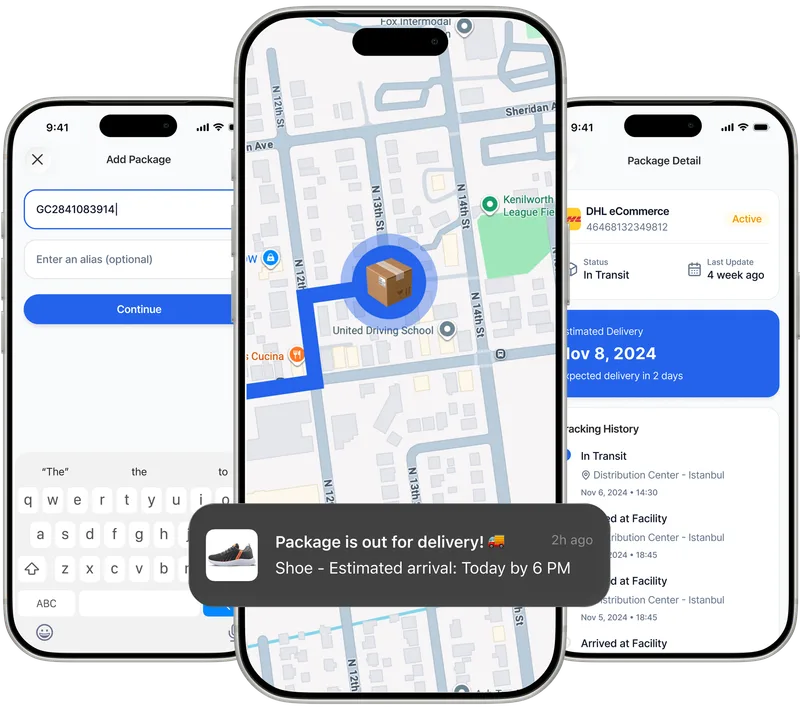
ATI tracking can be frustrating on their standard platform, especially if you're managing multiple shipments or prefer a cleaner, more user-friendly interface. This is where Paxlo makes a real difference. By consolidating ATI tracking with other carriers in one app, you gain instant access to package status updates without switching between websites or apps.
Paxlo connects directly to ATI's tracking database, pulling real-time updates about your shipment's location and estimated delivery time. Whether you're waiting for a purchase to arrive or managing business inventory, the app keeps you informed with push notifications at every step.
Getting started takes just a minute. Open Paxlo, select ATI from the carrier list, and enter your tracking number. The app immediately connects to ATI's system and retrieves your shipment details. You'll see the current package status, location, and expected delivery date right on your screen.
For frequent ATI users, consider adding the carrier to your favorites. This keeps ATI shipments sorted at the top of your tracking list, making it easy to monitor ongoing deliveries without scrolling through other carriers.
Push notifications keep you updated automatically. You'll receive alerts when your package is in transit, out for delivery, or has been delivered, eliminating the need to manually check the app every few hours.
Understanding ATI's tracking updates helps you know what to expect at each stage of delivery. ATI shipments typically follow a standard progression, though variations occur based on destination and service type.
If your package status stalls at 'In transit' for more than the expected timeframe, Paxlo's interface makes it easy to review detailed history and contact ATI support if needed. The app displays all tracking events with timestamps, giving you a complete picture of your shipment's journey.
China's express delivery market includes several major players like SF Express, ZTO, and YTO. ATI occupies the middle ground, offering solid reliability and value without the premium pricing of SF or the volume-focused approach of some competitors.
ATI's strength lies in consistent delivery windows and straightforward pricing. For domestic shipments within China, especially those prioritizing cost over speed, ATI consistently delivers. The carrier's integration with Paxlo means you can compare ATI performance against your other shipments and make informed decisions about carrier selection.
Most people don't ship exclusively through one carrier. You might use ATI for one purchase, SF Express for another, and possibly international couriers for cross-border orders. Managing each through their own tracking platform creates friction and information scattered across multiple apps and websites.
Paxlo solves this by unifying all your shipments in one place. Add an ATI tracking number alongside your other carriers, and everything syncs automatically. This becomes invaluable when you're tracking packages from different online purchases, or if you're a seller managing outbound shipments across multiple services.
The time savings add up quickly, especially if you receive packages regularly or manage business logistics. Paxlo eliminates the habit of opening multiple browser tabs or searching for carrier websites just to check a package status.
Occasionally, packages encounter delays or delivery problems. ATI's tracking system updates to reflect issues like failed delivery attempts, address corrections needed, or routing delays. Paxlo displays these status changes immediately, so you're aware of any problems before ATI attempts to contact you.
When a package shows an exception status, Paxlo provides the tracking history leading up to that point. You'll see exactly when and where the issue occurred, giving you context to address it. From there, you can contact ATI support directly with your tracking number and specific details about the exception.
For delivery failures or address issues, ATI typically attempts redelivery or contacts you through the phone number provided at shipment. Having the tracking history from Paxlo handy makes those conversations more efficient. You'll have timestamps and location data to reference when discussing the package status.
Download Paxlo from the iOS App Store or Google Play Store. Create an account or sign in with your existing credentials. Begin adding ATI tracking numbers immediately, or sync existing tracking data if you have it saved elsewhere.
The app's interface guides you through adding new shipments. Search for ATI, enter your tracking number, and let Paxlo handle the rest. Within seconds, you'll see real-time tracking information and automatic notifications about your package's progress. No complicated setup, no additional fees, just cleaner tracking the way it should be.
Your ATI tracking number appears on the shipping label attached to your package or in the order confirmation email from the sender. It's typically a series of numbers starting with the ATI identifier. If you purchased an item online, check your account on the seller's website or your email receipt. The tracking number looks something like a 12-15 digit code and is specifically formatted for ATI's system.
Yes. Paxlo works from anywhere in the world, and ATI tracking information is accessible regardless of your location. However, ATI primarily handles domestic China deliveries, so if your package is being shipped internationally, it likely transfers to another carrier at the border. In that case, you'd track it through both ATI and the international carrier. Paxlo supports adding multiple carriers for shipments that change hands during transit.
Paxlo pulls tracking information directly from ATI's system in real-time, so the data is as current as ATI's own updates. Most packages show location updates every few hours as they move through ATI's network. However, the frequency depends on ATI's scanning infrastructure. In rural areas or during off-peak hours, updates might be less frequent. The most reliable indicator is always the 'Out for Delivery' status, which typically appears within 24 hours of actual delivery.
Packages occasionally experience delays due to weather, high volume, or routing issues. Check Paxlo's tracking history to see the last location update and timestamp. If the package hasn't moved in more than 48 hours beyond the expected delivery date, contact ATI support with your tracking number and the details Paxlo displays. Provide the last recorded location and time to help ATI investigate. In most cases, packages resume movement within a day or two. If there's a legitimate issue, ATI can file a claim or arrange redelivery.
Absolutely. Add each ATI tracking number individually to Paxlo, and the app displays them all in your shipment list. You can organize them by adding labels or notes, making it easy to identify which package is which if you're tracking several at once. For bulk tracking, some business users export their tracking numbers to Paxlo if available, but typically you'll add them one by one as shipments are created. The app consolidates everything in a clean timeline view.
No. Paxlo is free to download and use for tracking any carrier, including ATI. There are no subscription fees, no premium tracking tiers, and no hidden charges. The app is supported by advertising and partnerships, not by charging users to track packages. Add as many ATI shipments as you need without worrying about costs.
Download Paxlo and track all your packages in one place. Free, fast, and trusted by 50,000+ users worldwide.