Netherlands
Track Dynalogic shipments in real-time with Paxlo. Get instant updates on your Dutch logistics deliveries straight to your phone.
Dynalogic is a major logistics provider based in the Netherlands, specializing in parcel and package distribution across Europe. Founded in the early 2000s, the company has built its reputation on reliable same-day and next-day delivery services, particularly for e-commerce businesses operating in the Dutch and European markets. Dynalogic operates a network of distribution centers and pickup points, making it a trusted choice for both B2B and B2C shipments.
The company plays a critical role in the Netherlands' logistics infrastructure. With the rise of online shopping, Dynalogic has expanded its services to handle the increasing volume of packages moving through Dutch cities and across borders. Their focus on sustainability and efficient route planning has positioned them as a forward-thinking player in an increasingly competitive market.
Dynalogic's service model is built around speed and reliability. They understand that missed deliveries and unclear tracking create friction for both businesses and consumers. That's why they've invested in a robust infrastructure and technology platform that provides visibility every step of the way.
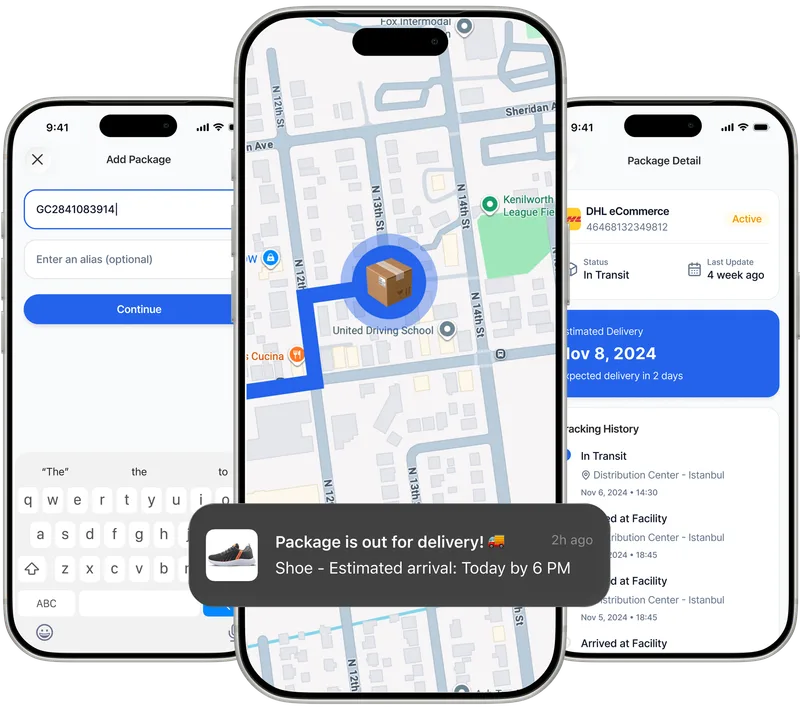
Paxlo connects directly to Dynalogic's tracking system, pulling live shipment data so you always know where your package is. Instead of switching between apps or logging into a website, you get all your Dynalogic tracking information in one mobile interface alongside shipments from other carriers.
The integration works automatically. Once a Dynalogic tracking number is added to Paxlo, the app fetches the latest status updates in real-time. You'll see estimated delivery windows, current location details, and any delivery attempts without needing to visit Dynalogic's site directly.
Dynalogic's tracking data is updated frequently as packages move through their network. Paxlo displays these updates instantly, so you're never left guessing. Whether your shipment is at a sorting facility, out for delivery, or awaiting pickup, Paxlo shows the current status with timestamps.
This is especially useful for time-sensitive shipments. If a delivery is scheduled for a specific time window, Paxlo's notifications let you know when the driver is nearby, reducing the chance you'll miss the delivery.
Many people receive packages from various carriers. Paxlo's multi-carrier support means you don't need separate apps for Dynalogic, DHL, UPS, or local couriers. Add all your tracking numbers to Paxlo and manage them from a single dashboard. This saves time and reduces app clutter on your phone.
The app lets you organize shipments by status (in transit, arriving soon, delivered), making it easy to see at a glance which packages need attention and which have already arrived.
Adding a Dynalogic shipment to Paxlo takes seconds. Download the app on iOS or Android, enter your tracking number, and the app automatically detects it's a Dynalogic package. From there, tracking data refreshes automatically, and you'll receive notifications for all status changes.
No login required, no account setup beyond the app itself. Paxlo keeps tracking simple and focused on what matters: knowing when your package arrives.
Open the Paxlo app and enter your Dynalogic tracking number. The app automatically recognizes Dynalogic shipments and pulls real-time tracking data from their system. You'll see the current status, estimated delivery date, and any location information available. Updates happen automatically as your package moves through the network.
Yes. Paxlo sends push notifications for all status changes, including when your Dynalogic package is out for delivery and when it's been delivered. You can customize notification settings in the app to control how often you're alerted.
Absolutely. Add as many Dynalogic tracking numbers as you need to Paxlo. The app organizes them by status, so you can quickly see which are arriving soon, in transit, or already delivered. You can also mix Dynalogic shipments with packages from other carriers in the same app.
Paxlo displays the current tracking status, estimated delivery date and time window, last known location, and any delivery notes from Dynalogic. If a delivery attempt was made, that information is included too. The specific details available depend on what Dynalogic has scanned and recorded in their system.
No. Paxlo is free to download and use for tracking any carrier, including Dynalogic. There are no hidden fees or subscription costs for basic tracking features.
Paxlo will update you with the latest status from Dynalogic. If your shipment is delayed, the app reflects that as soon as Dynalogic updates their system. You can contact Dynalogic directly with your tracking number for specific details about the delay. Paxlo provides the tracking information, but Dynalogic's customer service handles delay inquiries and complaints.
Yes. If your Dynalogic shipment is being delivered to a pickup point, Paxlo tracks that too. You'll see when the package arrives at the pickup location and can set up notifications to remind you to collect it within the timeframe Dynalogic allows.
Download Paxlo and track all your packages in one place. Free, fast, and trusted by 50,000+ users worldwide.