China
Track HOSTO parcels in real-time with Paxlo. Get instant updates on your China shipments without leaving the app.
HOSTO is a growing domestic logistics provider based in China that specializes in parcel delivery across the country. The company operates a network of distribution centers and pickup points, serving both individual senders and small to medium-sized e-commerce businesses. HOSTO focuses on reliable, cost-effective delivery solutions for packages within China's major cities and regions.
Founded to address demand for affordable local shipping, HOSTO has built a reputation for handling standard parcels efficiently. The carrier processes thousands of shipments daily and maintains partnerships with online marketplaces and retailers looking for competitive delivery rates.
China's logistics sector is dominated by a few major players, but regional and mid-tier carriers like HOSTO fill an important gap. They offer flexibility and affordability for senders who don't require the premium services of larger networks. HOSTO competes by maintaining lower overhead and focusing on core domestic delivery rather than attempting international expansion.
The carrier operates primarily within mainland China, making it a practical choice for local e-commerce shipments, returns, and business-to-consumer deliveries. Their pricing model appeals to cost-conscious sellers and frequent shippers who value straightforward, no-frills service.
HOSTO's service model is straightforward. Packages are collected from pickup points or sender addresses, transported through regional hubs, and delivered to destination addresses. Delivery times vary by distance and route, typically ranging from 3-7 business days depending on location.
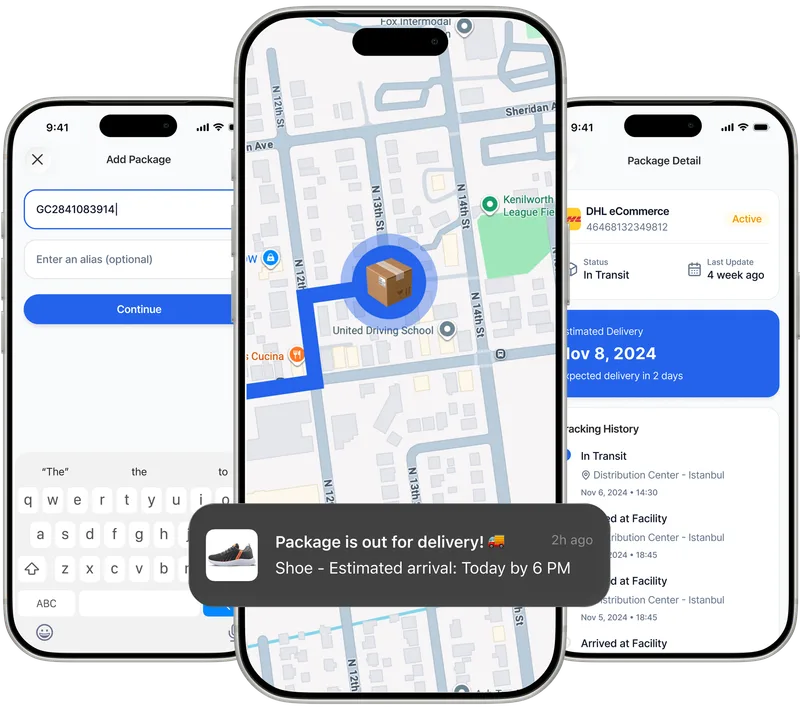
Paxlo connects directly to HOSTO's tracking system, pulling real-time shipment data so you can monitor your parcels from your phone. Instead of visiting HOSTO's website or calling their customer service, you simply open Paxlo, enter your tracking number, and see exactly where your package is.
The integration works by querying HOSTO's tracking API at regular intervals. When your package moves between sorting facilities or delivery hubs, Paxlo updates automatically. You'll see timestamps for each scan, the current location of your parcel, and estimated delivery windows as your shipment progresses.
Managing HOSTO tracking through Paxlo eliminates the friction of visiting multiple websites or remembering different login credentials. You keep all your shipments organized in one place, whether they're coming from HOSTO, international carriers, or other domestic providers.
Paxlo's notifications mean you won't miss a delivery attempt. You'll know immediately when your package arrives at the local delivery depot, when it's out for delivery that day, and when it's been dropped off. This is especially useful if you're purchasing from multiple sellers or managing business shipments.
The app also solves the language barrier issue. While HOSTO's tracking pages are in Chinese, Paxlo displays tracking information in English and other languages. This is valuable if you're an international buyer receiving packages from Chinese sellers or marketplaces.
HOSTO is commonly used for e-commerce purchases from Chinese online stores, social commerce platforms, and marketplace sellers. If you buy items from sites like Pinduoduo, local Taobao shops, or other Chinese retailers, your order might arrive via HOSTO.
Businesses also use HOSTO for returns processing and inter-warehouse transfers. If you're running an online store with warehouses in different Chinese cities, HOSTO can move inventory between locations at competitive rates.
Your HOSTO tracking number is usually provided by the seller immediately after purchase. Save it right away in Paxlo so you don't lose it. Tracking becomes active once the package is handed off to HOSTO at the origin facility, which may take a few hours or sometimes a day after your order is confirmed.
In rare cases where tracking information seems outdated, the package may be in a sorting facility experiencing high volume. HOSTO updates their system regularly, but rural or remote destinations sometimes take longer to receive scan updates. If you haven't received your package and tracking hasn't updated in several days, contact the sender's customer service first to verify the shipment was actually dispatched.
Keep your Paxlo app notifications enabled so you catch delivery alerts. HOSTO delivery personnel typically attempt delivery during business hours, and you may need to be available or arrange alternative delivery with them if you're not home.
Download Paxlo on iOS or Android, open the app, and tap the plus icon to add a new tracking number. Enter your HOSTO tracking number (usually a long string of digits provided by the seller), and Paxlo will immediately connect to HOSTO's system. Your package location, status, and estimated delivery date will display on your screen. The app updates automatically as your shipment moves.
Paxlo displays the full tracking history for your HOSTO shipment, including the date and time each scan occurred, the facility or location where the package was processed, and its current status. You'll see checkpoints like 'Picked up from sender', 'Arrived at origin sorting center', 'In transit', 'Arrived at destination', and 'Out for delivery'. The estimated delivery date appears at the top of the tracking screen.
HOSTO's delivery times depend on distance and destination location. Most packages within major Chinese cities arrive within 3-5 business days. Shipments to smaller cities or remote regions may take 7-10 business days. Once tracking shows your package is 'out for delivery', it should arrive the same day or next business day. Paxlo's estimated delivery date gives you a more specific window based on HOSTO's data.
Yes. Enable push notifications in Paxlo's settings, and the app will alert you at key moments during your HOSTO shipment's journey. You'll receive notifications when your package is out for delivery, when it's been delivered, and if there are any delivery exceptions or delays. This way, you won't miss a delivery attempt and won't have to check the app repeatedly.
Double-check that you've entered the tracking number correctly, with no extra spaces or characters. The seller should provide the tracking number within a few hours of your purchase, but tracking may take a few more hours to activate on HOSTO's system. If you're copying the number from an email or message, paste it carefully into Paxlo. If the number still isn't recognized after 24 hours, contact the seller to confirm the package was actually dispatched and ask for the correct tracking number.
Absolutely. Add as many HOSTO tracking numbers to Paxlo as you need, and they'll all appear in your main tracking list. You can organize them, add notes, and archive old shipments. This is useful if you've ordered from multiple Chinese sellers or are tracking different items in bulk orders. Paxlo displays all your packages in one view, making it easy to monitor several HOSTO shipments simultaneously.
Download Paxlo and track all your packages in one place. Free, fast, and trusted by 50,000+ users worldwide.