Denmark
Track Scan Global Logistics shipments in real-time with Paxlo. Get instant updates on your Danish parcels from one of Scandinavia's largest logistics providers.
Scan Global Logistics is one of Denmark's leading logistics and parcel delivery companies, headquartered in Aarhus. Founded in 1978, the company has grown from a regional carrier into a major player across Scandinavia and Northern Europe. With a network spanning multiple countries, Scan handles millions of parcels annually for both businesses and consumers.
The company operates a sophisticated distribution network with sorting facilities, delivery hubs, and local pickup points. Scan's role in Denmark's logistics ecosystem is critical. They connect e-commerce businesses to their customers, manage returns, and provide flexible delivery options that have become standard expectations for online shopping.
Scan Global Logistics offers a comprehensive range of parcel services tailored to different customer needs and budgets.
Many Danish e-commerce companies rely on Scan as their primary logistics partner. The company's pickup network includes supermarkets, convenience stores, and dedicated parcel lockers, making it easy for customers to collect packages at times that suit their schedules.
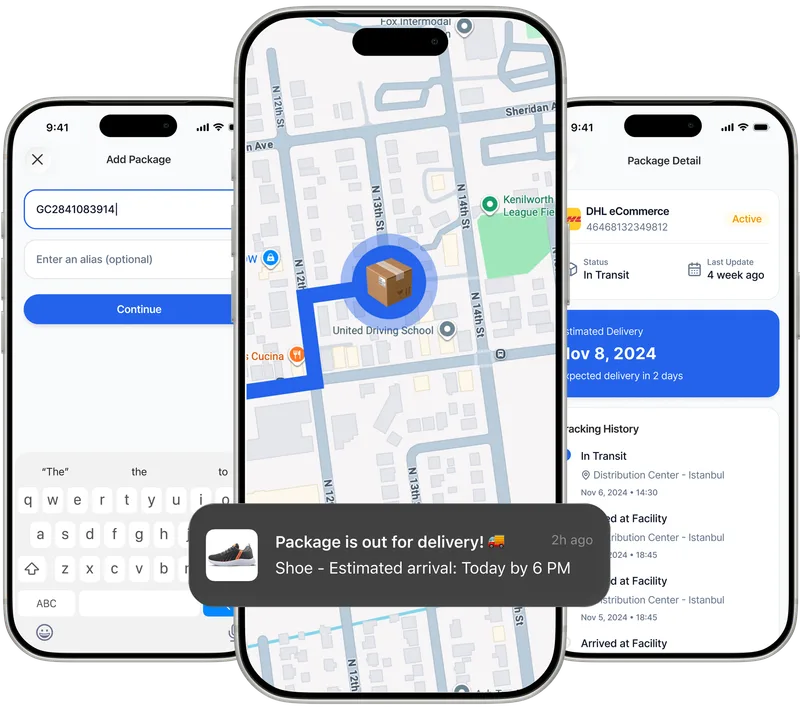
Paxlo connects directly to Scan Global Logistics' tracking system, pulling live shipment data into a single app. Instead of visiting Scan's website or checking multiple carrier apps, you get all your package information in one place.
The integration is automatic. When a Scan Global Logistics tracking number is added to Paxlo, the app immediately starts pulling tracking data. You don't need to switch apps or visit different websites. Everything updates in real-time.
Tracking a single package is straightforward. Tracking multiple shipments from different carriers becomes complicated fast. Paxlo simplifies this by consolidating all your parcels, including Scan deliveries, into one organized view.
Users benefit from consistent, predictable notifications. Rather than wondering when a Scan parcel will arrive, you get updates at every stage. The app tells you when your package leaves the distribution center, when it's out for delivery that day, and when it's available for pickup. This eliminates the guessing game and lets you plan accordingly.
For businesses managing inventory or fulfilling customer orders, Paxlo provides valuable visibility. You can track shipments you've sent to customers, monitor inbound supplies from vendors, and share tracking links with colleagues or customers directly from the app.
The pickup point finder is particularly useful. If you prefer not to have a parcel delivered to your home, Paxlo shows every Scan pickup location near you with current opening hours. You can check availability before your package arrives.
Danish consumers use Paxlo to track Scan deliveries in everyday situations. An online shopper orders from a Danish retailer and receives a Scan tracking number via email. They add it to Paxlo and get notified when the package enters the delivery network. The app shows their local delivery depot and estimated delivery date. On delivery day, a push notification alerts them that it's out for delivery, and they can see whether it's headed to their address or a nearby pickup point.
Business users benefit differently. A small e-commerce company ships dozens of orders daily via Scan. The business owner uses Paxlo to track outbound shipments, ensuring they've left the distribution center and are on their way to customers. If a customer complains about a missing package, the owner can quickly pull up tracking data from the app without logging into a separate carrier portal.
Scan competes alongside other major carriers like GLS, PostNord, and DPD in the Danish market. What sets Scan apart is their strong focus on the Scandinavian region and their extensive pickup network. Many Danes are familiar with Scan because the company has invested heavily in local infrastructure and customer service.
The company continues to adapt to changing consumer expectations. Same-day and next-day delivery have become increasingly important as e-commerce accelerates. Scan has expanded these services in Copenhagen and other major cities to stay competitive.
Tracking Scan Global Logistics packages with Paxlo takes seconds. Download the app from the App Store or Google Play, then enter your Scan tracking number. The app immediately connects to Scan's system and displays your shipment status. You can save multiple tracking numbers and organize them by date, sender, or custom labels.
Notifications keep you informed without overwhelming you. Set your preferences to receive alerts only for major milestones or get updates at every step. The choice is yours. Most users find that timely delivery notifications help them plan their day and avoid missed deliveries.
Open Paxlo and tap the plus icon to add a new shipment. Enter your Scan tracking number in the search field. The app automatically detects it as a Scan shipment and begins pulling real-time tracking data from their system. Your package will then appear in your Paxlo dashboard with live updates.
Yes. Paxlo sends push notifications at key stages of your Scan shipment's journey. You'll be alerted when your package leaves the distribution center, when it's out for delivery that day, when it's available for pickup, and when it's been delivered. You can customize notification settings in the app to receive as many or as few alerts as you prefer.
If your Scan shipment is being delivered to a pickup point rather than your home address, Paxlo displays the full address, opening hours, and directions to that location. You can also use the pickup point finder to view all nearby Scan pickup locations and their availability. This is especially helpful if you want to collect your package at a more convenient time than the attempted home delivery.
Paxlo pulls live data directly from Scan Global Logistics' tracking system multiple times throughout the day. Updates typically appear within minutes of events occurring in Scan's network. During peak delivery periods, there may be slight delays as the carrier processes thousands of scans, but you'll always be viewing the most current information available.
Paxlo shows real-time location and status updates that reveal delays or issues. If your package is delayed, the app will display a revised estimated delivery date based on Scan's latest scanning data. If you believe there's a problem, contact Scan Global Logistics directly using the carrier contact information available in Paxlo. You can also share your tracking information with Scan's customer service team for faster resolution.
Absolutely. Add as many Scan tracking numbers as you need to Paxlo. The app organizes all your shipments in a single dashboard so you can monitor multiple packages simultaneously. This is particularly useful if you're expecting several deliveries or if you run a business that ships multiple orders daily. You can sort shipments by carrier, date, or custom labels for easy management.
Download Paxlo and track all your packages in one place. Free, fast, and trusted by 50,000+ users worldwide.