United States
Track SpeedX shipments in real-time with Paxlo. Get delivery updates, proof of delivery, and estimated arrival times directly in the app.
SpeedX is a major regional carrier serving the United States with a focus on fast ground and express delivery. Founded in the early 2000s, SpeedX has built a reputation for reliability and speed across multiple service tiers. The company operates a network of distribution centers and pickup locations throughout the continental US, handling everything from small parcels to larger shipments for both individual senders and enterprise clients.
As a carrier, SpeedX competes directly with larger national players by offering competitive rates and flexible service options. The company has invested heavily in route optimization and last-mile delivery infrastructure, making it a preferred choice for businesses looking for alternatives to major carriers without sacrificing service quality.
SpeedX offers several service levels designed to meet different shipping needs and budgets:
Each service tier includes basic tracking capabilities, but SpeedX integration with Paxlo goes beyond standard carrier notifications. You get richer data, better timing predictions, and a unified view of your shipment status without switching between multiple apps or websites.
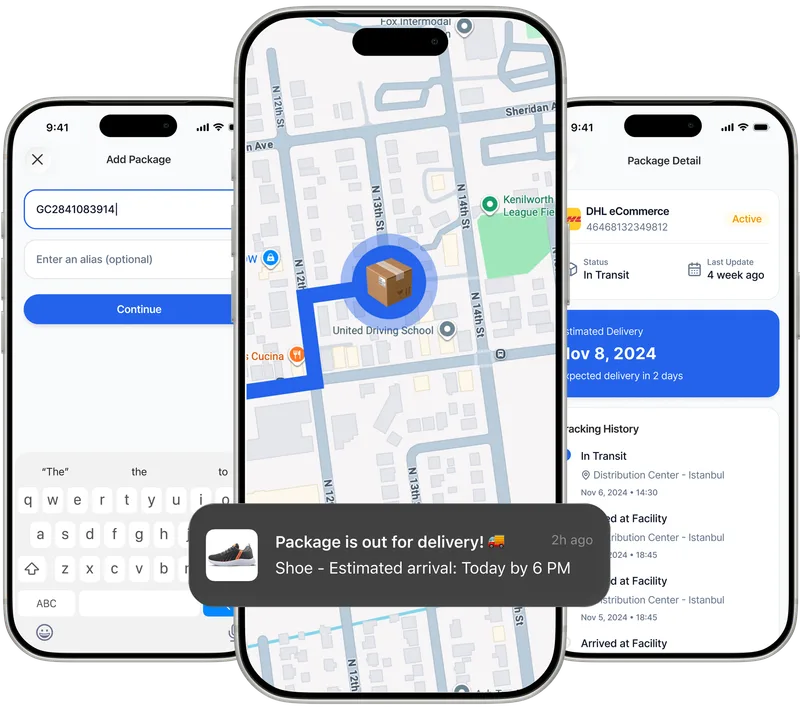
When you add a SpeedX tracking number to Paxlo, the app connects directly to SpeedX's tracking system and pulls real-time updates. You don't need to visit SpeedX's website or remember your tracking number. Instead, everything flows into one mobile interface.
Paxlo automatically detects SpeedX shipments from your email confirmations if you enable email sync, or you can manually paste your tracking number. Once added, you'll receive push notifications at key milestones: package picked up, in transit, out for delivery, and delivery confirmation.
The app also displays estimated delivery windows with greater accuracy than carrier websites often provide. If a package is delayed, you'll know about it faster, and you can take action, whether that means rescheduling delivery or contacting the carrier directly from within Paxlo.
For e-commerce businesses and resellers, managing multiple carriers is part of daily operations. Paxlo eliminates the friction of logging into different carrier portals. When a customer asks for an update, you pull up Paxlo instead of searching for the right tracking link or carrier website.
For individual shoppers, Paxlo works the same way. Whether you're expecting a SpeedX delivery today or a UPS package next week, everything syncs in one place. You get consistent notifications and a cleaner experience than relying on email alerts from each carrier.
SpeedX specifically benefits from Paxlo's multi-carrier approach because many people still don't think of SpeedX first. By putting SpeedX tracking on equal footing with major carriers in Paxlo, you start seeing SpeedX shipments pop up naturally alongside your other deliveries. That visibility encourages you to use SpeedX again because the experience is just as smooth.
Adding a SpeedX shipment to Paxlo takes seconds. Download Paxlo on iOS or Android, create your free account, and enter your tracking number. You can also connect your email account to let Paxlo scan for shipping confirmations automatically. Once a SpeedX tracking number is recognized, Paxlo immediately starts pulling updates.
For frequent SpeedX users, consider enabling notifications for the carrier. That way, every update from SpeedX goes directly to your phone, and you never miss a delivery window change or delivery confirmation.
Beyond basic tracking status, Paxlo displays:
SpeedX ground service typically takes 3-7 business days depending on origin and destination. Express options can reduce that to 1-2 business days. Paxlo displays the service level for each shipment and shows you the expected delivery date based on that service tier.
If your SpeedX package is running late, you'll see the status change in Paxlo before the carrier's main website updates. This early visibility helps you adjust expectations or reach out to SpeedX support with specific information about your shipment.
Paxlo is built for people who receive packages from multiple carriers. Rather than opening three different websites or apps, you get one unified inbox for all your shipments. SpeedX integrates seamlessly into that ecosystem, giving you the same tracking power you'd get from visiting SpeedX directly, but with the added convenience of a single dashboard.
The app is free to download and use. Paxlo makes money through optional premium features and partnerships, not by charging you to track packages. Download Paxlo today and start tracking your SpeedX shipments alongside all your other deliveries.
Yes. Paxlo supports SpeedX tracking across all service levels. Enter your SpeedX tracking number in the app, and you'll get real-time updates including pickup, in-transit scans, out-for-delivery status, and delivery confirmation. You can also enable email sync to automatically import SpeedX tracking numbers from your shipping confirmations.
Paxlo pulls updates from SpeedX every time you open the app and at regular intervals in the background. When SpeedX scans your package, the update typically appears in Paxlo within minutes. Push notifications alert you immediately for major status changes like out-for-delivery and delivery confirmation.
Paxlo shows you the current status and any delay notifications from SpeedX. If a package appears stuck or hasn't been scanned in an unusual amount of time, you'll see that in the tracking history. From within Paxlo, you can contact SpeedX support directly using the carrier contact information provided. Many issues can be resolved by confirming the delivery address or getting clarity on an in-transit delay.
Yes. Whether you're tracking a SpeedX ground shipment, express delivery, or signature-required package, Paxlo handles all service tiers. The app displays the specific service level you selected and shows the relevant delivery window for that service. Special handling instructions and delivery confirmation details also appear in the tracking view.
Absolutely. Add as many SpeedX tracking numbers as you need. Paxlo displays all active packages in your inbox and lets you filter or search by carrier, sender, or date. For businesses receiving dozens of shipments daily, this ability to manage all SpeedX packages in one view is a huge time saver.
Yes. Downloading Paxlo and tracking SpeedX packages is completely free. There are optional premium features available, but basic tracking across all carriers, including SpeedX, requires no payment. You can track as many packages as you want without ever paying a subscription fee.
Download Paxlo and track all your packages in one place. Free, fast, and trusted by 50,000+ users worldwide.