Stellar is one of China's growing logistics providers, focused on delivering parcels efficiently across domestic routes. The carrier handles millions of shipments annually, serving e-commerce businesses, retailers, and individual senders throughout the country. With strategically positioned distribution centers and a network of local pickup points, Stellar competes in China's highly competitive express delivery market.
Founded to address gaps in regional delivery coverage, Stellar has built a reputation for reliable service in secondary and tertiary cities where larger carriers sometimes struggle. The company operates as part of China's broader logistics ecosystem, which moves roughly 800 million packages per year domestically.
China's logistics network is dominated by major players, but Stellar has carved out a niche by offering competitive rates and personalized service. The carrier understands local delivery challenges, particularly in rural areas and smaller municipalities where demand has exploded due to online shopping growth. This localized approach gives Stellar an edge for businesses targeting regional markets.
The Chinese parcel delivery sector operates under strict regulatory oversight. Stellar complies with all regulations regarding data security, delivery timelines, and customer service standards set by the China Post and other governing bodies. Transparency in tracking and reliable service are now baseline expectations that Stellar meets consistently.
Stellar's service options cater to different business needs. Small e-commerce shops can use basic ground delivery, while larger retailers benefit from bulk rate discounts and dedicated account management. The carrier also offers specialized handling for sensitive goods and temperature-controlled shipping for certain product categories.
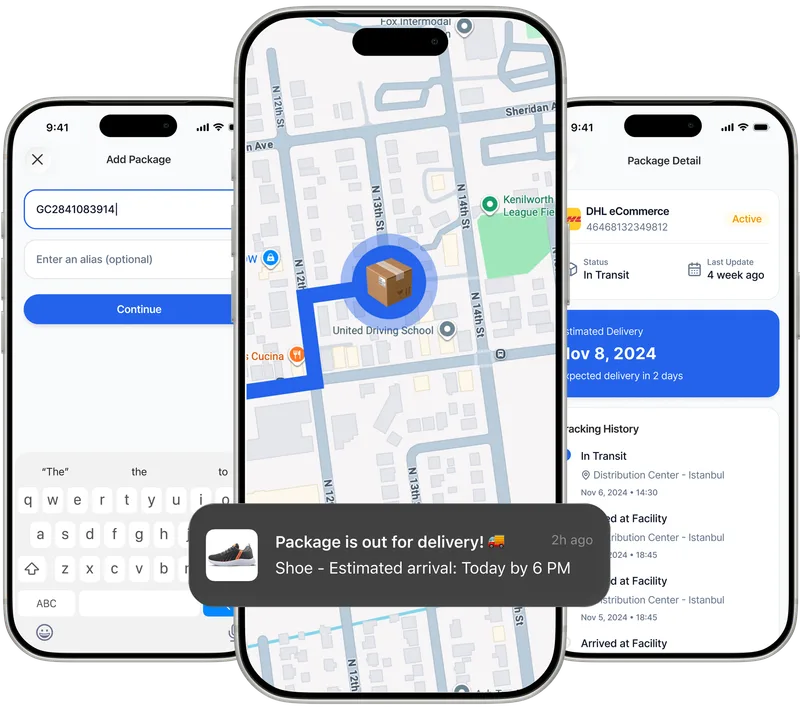
Paxlo connects directly to Stellar's tracking system, pulling real-time delivery updates and status information. When you enter a Stellar tracking number into Paxlo, the app fetches the latest location data, estimated delivery dates, and any delays or exceptions. This integration means you don't have to visit Stellar's website or receive SMS alerts scattered across your phone.
The Paxlo app consolidates all your shipments from multiple carriers in one place. If you're tracking packages from Stellar alongside orders from DHL, JD.com, or other carriers, Paxlo organizes everything in a clean, chronological feed. You can set custom notifications, add delivery notes, and share tracking links with customers or family members directly from the app.
For businesses using Stellar for customer shipments, Paxlo offers a significant advantage. You can white-label or customize notifications, ensure consistent branding in customer communications, and reduce support inquiries by giving customers proactive delivery updates. The app's interface is intuitive, so customers unfamiliar with Chinese logistics won't feel overwhelmed.
Stellar typically delivers within 2 to 5 business days for standard service across most of mainland China. Express options can cut this to 1 to 2 days in major metropolitan areas like Beijing, Shanghai, and Guangzhou. Coverage extends to remote provinces, though delivery times may stretch longer due to distance and terrain. Paxlo's tracking shows exactly where your package sits in the delivery chain at any moment.
Peak season capacity is something to watch. During Chinese New Year, Double Eleven (Singles Day), and other major shopping events, Stellar experiences volume surges. While the carrier adds temporary staff and resources, deliveries slow slightly. Paxlo's tracking gives you visibility during these congested periods so you know what to expect.
Stellar doesn't offer its own branded mobile app for consumers. This makes Paxlo especially valuable. Rather than bookmarking Stellar's website or managing tracking numbers in spreadsheets, you get a purpose-built app that speaks your language and handles all your logistics needs.
Paxlo is available on both iOS and Android, so whether you're using an iPhone or Android device, the experience is consistent and optimized. The app updates frequently based on user feedback, meaning tracking becomes faster and more accurate over time. Plus, Paxlo supports dozens of carriers, so if you split orders between Stellar and competitors, one app handles everything.
Download Paxlo today and start tracking your Stellar shipments with real-time precision, custom alerts, and the convenience of managing all your parcels in a single, user-friendly platform.
Open the Paxlo app, tap the plus icon to add a new shipment, and paste your Stellar tracking number. Paxlo instantly retrieves your package's current location, last scan timestamp, and estimated delivery date. You'll receive push notifications whenever the status changes. If you have multiple Stellar orders, add them all and they'll appear in your main feed sorted by delivery date.
First, check Paxlo to see the latest tracking event. If your package is stuck in a transit hub or showing an exception, Paxlo lets you contact Stellar's customer service directly. Delays often occur at sorting facilities during peak times or due to weather. Paxlo's detailed tracking history shows exactly when and where delays happen, so you have facts to reference when contacting support.
Yes. In Paxlo, open any Stellar shipment and tap the share icon. You can send a tracking link via email, messaging, or social media. The recipient doesn't need a Paxlo account to view the tracking information. This is helpful if you're sending a gift or if a customer wants to monitor their order without downloading the app.
Yes, Paxlo tracks both Stellar's standard and express services. The app doesn't distinguish between service types, but your tracking number and Stellar's backend will identify which service was used. Express packages typically show faster scan updates as they move through fewer sorting facilities.
If a package disappears from Stellar's tracking with no delivery scan after the expected delivery date, contact Stellar's claims department immediately. Paxlo's tracking history provides documentation of the last known location and scan time, which is valuable evidence for your claim. File a claim within the time window specified by Stellar, usually 30 days from the shipment date. Many claims result in refunds or replacements.
Yes, Paxlo's basic tracking features are completely free. You can add unlimited Stellar shipments, receive notifications, and check tracking history without paying anything. Paxlo also offers premium features like enhanced notifications and advanced filtering for a small optional subscription, but standard Stellar tracking is at no cost.
Download Paxlo and track all your packages in one place. Free, fast, and trusted by 50,000+ users worldwide.