United States
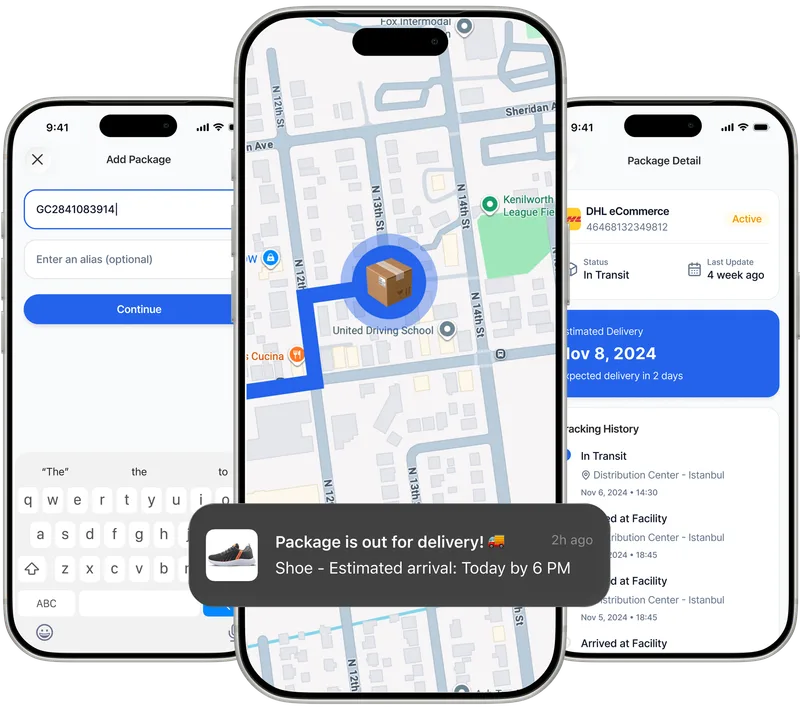
Track UPS packages in real time with Paxlo. Get instant delivery notifications, manage multiple shipments, and monitor UPS Ground, Air, and international delive…
United Parcel Service, universally known as UPS, stands as one of the world's largest package delivery and supply chain management companies. Founded in 1907 as a messenger service in Seattle, UPS has grown into a logistics giant that delivers more than 24 million packages daily across 220 countries and territories. In the United States alone, UPS operates the most extensive ground network, making it the carrier behind millions of e-commerce orders, business shipments, and time-sensitive deliveries every single day.
The company's signature brown trucks have become synonymous with reliable delivery service. UPS handles everything from small residential packages to large freight shipments, serving both individual consumers and major corporations. Their service portfolio spans multiple speed tiers, from economy ground shipping to next-day air delivery, giving shippers flexible options based on urgency and budget.
UPS offers distinct service levels that cater to different delivery needs. Understanding these services helps you set accurate expectations for when your package will arrive:
Paxlo automatically identifies which UPS service is handling your shipment and provides accurate estimated delivery dates based on the specific service level. You don't need to manually categorize your packages or calculate delivery windows.
Tracking a UPS package traditionally means visiting the UPS website, entering your tracking number, and checking back repeatedly for updates. Paxlo eliminates this friction by consolidating all your UPS shipments into one clean interface alongside packages from dozens of other carriers. The moment UPS scans your package at any facility, Paxlo pulls that data and sends you an instant notification.
The app connects directly to UPS's tracking systems using your tracking number. Whether you're expecting a UPS Ground delivery from across the country or a Next Day Air package arriving tomorrow morning, Paxlo monitors every scan and movement update. You can add packages by manually entering the tracking number, scanning a barcode, or forwarding shipping confirmation emails to Paxlo, which automatically extracts the tracking information.
What sets Paxlo apart is intelligent notification filtering. Instead of bombarding you with every minor scan event, Paxlo highlights the updates that actually matter: when your package leaves the origin facility, when it arrives in your local area, when it's out for delivery, and when it's been delivered. You stay informed without notification fatigue.
Managing multiple UPS shipments becomes exponentially easier when you use a dedicated tracking app. Here's what you gain:
These features work automatically once you add a UPS tracking number to Paxlo. The app handles the complexity of monitoring shipment status while you go about your day.
UPS tracking numbers typically contain 18 characters starting with '1Z' followed by a 6-character shipper number and additional digits. This unique identifier connects to your specific package as it moves through the UPS network. Every time a UPS employee or automated system scans your package, that event gets logged with a timestamp and location.
Common scan events you'll see include 'Origin Scan' when the package enters the UPS system, 'Departure Scan' as it leaves facilities, 'Arrival Scan' when it reaches new locations, 'Out for Delivery' when it's loaded onto the delivery truck, and 'Delivered' when the driver completes the drop-off. Paxlo translates these technical status codes into plain language so you understand exactly where your package is and what's happening with it.
Occasionally, you might see exception scans like 'Weather Delay' or 'Address Correction Needed.' Paxlo surfaces these important alerts prominently so you can take action if required, such as contacting the sender to verify the shipping address or understanding that severe weather has temporarily delayed transit.
UPS's dominance in the American logistics market stems from its unmatched infrastructure. The company operates hundreds of sorting facilities, maintains a fleet of over 125,000 vehicles, and employs more than 500,000 people worldwide. This scale translates to consistent service and wide coverage, reaching virtually every address in the United States.
Business customers appreciate UPS for its reliability and sophisticated shipping tools. The company offers guaranteed delivery times with money-back promises on many services, giving shippers confidence that packages will arrive when expected. For consumers, UPS provides convenient options like UPS Access Point locations where you can pick up packages if you miss a delivery attempt, and UPS My Choice, which allows rerouting or rescheduling deliveries.
Whether you're a frequent online shopper receiving multiple UPS deliveries each week or someone waiting for an important one-time shipment, having reliable tracking visibility matters. Paxlo gives you that visibility without requiring you to become a UPS tracking expert or check the UPS website constantly throughout the day.
Open the Paxlo app and tap the add button, then enter your UPS tracking number (usually starting with '1Z'). You can also scan the barcode on your shipping label or forward your shipping confirmation email to Paxlo, which will automatically extract the tracking number. Once added, Paxlo monitors your UPS package and sends you notifications as the status updates.
New tracking numbers often take several hours to show movement after the label is created. The shipper might print the label but not drop off the package immediately. Once UPS performs the first origin scan, tracking updates begin flowing. If your tracking shows no updates for more than 24 hours after the expected ship date, contact the sender to confirm they actually handed the package to UPS.
This status indicates your package is loaded on a UPS delivery truck and will arrive at your address that same day. UPS drivers typically complete their routes between 9 AM and 7 PM, though exact timing varies by location and route density. Paxlo will notify you when this status appears so you know to expect delivery within hours.
Yes, Paxlo tracks UPS international services including UPS Worldwide Express, Worldwide Saver, and Standard shipping. The app monitors your package as it moves through customs and across borders, pulling tracking updates from UPS's global network. You'll receive notifications for customs clearance and delivery just like domestic shipments.
First, check around your delivery location including porches, side doors, garages, and with neighbors or household members. UPS drivers sometimes leave packages in safe spots away from plain view. Review the delivery photo and location details in Paxlo or on the UPS website. If you still cannot locate it after thorough searching, contact the shipper immediately to file a claim, as they hold the shipping contract with UPS.
Paxlo displays the estimated delivery date provided directly by UPS based on the service level and current package location. For services like UPS Ground, estimates may adjust as the package moves through the network. Guaranteed services like Next Day Air and 2nd Day Air have firm delivery commitments that UPS honors with money-back guarantees. Paxlo updates the estimated date automatically if UPS revises it due to delays or faster-than-expected transit.
Paxlo and UPS My Choice serve complementary purposes. UPS My Choice lets you manage delivery preferences like rerouting packages or authorizing release without signature, while Paxlo focuses on tracking visibility and notifications across all carriers. You can use both services simultaneously. Changes you make in UPS My Choice will reflect in the tracking updates that Paxlo displays as UPS updates the shipment status.
Download Paxlo and track all your packages in one place. Free, fast, and trusted by 50,000+ users worldwide.